
Most people commissioning a WordPress website have no way of judging what they are buying until it arrives. You approve a design, wait a fortnight, and hope. This post opens up the process: what happens at each stage, what you are actually responsible for, and where projects go wrong.
I have delivered over 200 of these. The pattern below is what works.
The six stages of a build
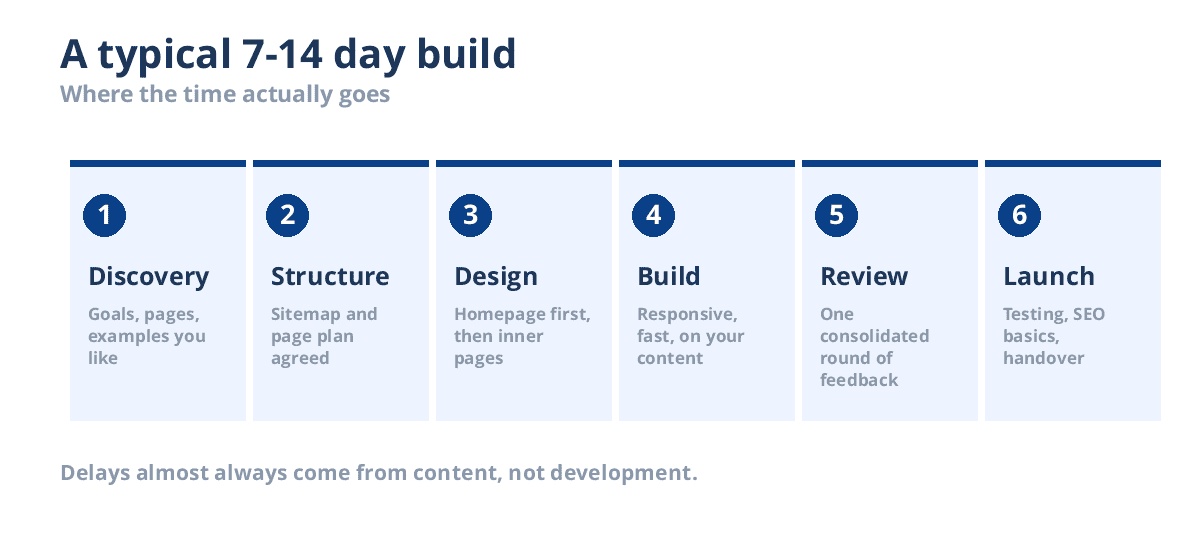
1. Discovery
Before anything is designed, three questions need answering: what should this website do, who is it for, and what does success look like? “Look more professional” is a feeling. “Get more enquiries from architects in Melbourne” is a brief.
This stage takes a conversation, not a month. But skipping it is why some websites look fine and produce nothing.
2. Structure
Next comes the sitemap: which pages exist, what each one is for, and how someone moves between them. Agreeing this before design is the single biggest time-saver in the whole project, because moving a page at this stage costs a sentence, and moving it after build costs hours.
3. Design
I design the homepage first and send it for review. It sets the visual direction — typography, colour, spacing, how sections breathe — and once approved, the inner pages follow quickly because the system is already decided.
If the homepage is wrong, we find out on day three rather than day twelve.
4. Build
The design becomes a working site: responsive across phone, tablet and desktop, built with Elementor Pro, with your real content in place. Not placeholder text — real content, because layouts that look good with perfect dummy copy often fall apart with a 60-character heading.
5. Review
You get the staging link and one consolidated round of feedback. Consolidated matters: a single list of twenty changes takes an afternoon, whereas twenty separate messages over a week takes far longer and costs you delivery time.
6. Launch
Testing across browsers and devices, speed checks, SEO basics, forms tested end to end, analytics connected, then the site goes live. You get a walkthrough video showing how to edit it yourself, and 30 days of support.
What you are responsible for
This is the part most quotes gloss over, and it is where timelines actually slip.
- Content. Text for each page, images, your logo. If you do not have it, say so early — structure and design can proceed while you gather it, but the build cannot finish without it.
- Access. Domain registrar, existing hosting, any current site.
- Decisions. Feedback within a few days at each review point. A project waiting a fortnight for approval is not a two-week project any more.
- One decision-maker. Feedback from four people with different opinions, arriving separately, is the most reliable way to derail a build.
None of this is difficult. But a developer who does not tell you upfront is setting you both up for a frustrating month.
Custom build or template?
An honest answer, since I sell both.
| Ready-made template | Custom build | |
|---|---|---|
| Cost | From $19 plus your setup time | From $200 |
| Speed | Live in a day if you are technical | 7–21 days |
| Fits your business | You adapt to the template | Built around how you actually work |
| Best for | Testing an idea, tight budget, simple needs | Anything where the website is a real sales channel |
If you are validating a business idea, buy a template. If the website is how customers find and judge you, a custom build pays for itself in enquiries.
Five mistakes that cost real money
Choosing on price alone
A $80 website and a $600 website are not the same product at different prices. The cheap one is usually a template with your logo dropped in, no SEO structure, and no support when it breaks. That is fine if you know that is what you are buying.
Plugin sprawl
Every plugin is code someone else maintains, and each one is a potential conflict, security hole and speed cost. I have seen business sites running 45 plugins where a dozen would do. Fewer, better-chosen plugins is almost always the right call.
Ignoring speed until after launch
Speed is not a finishing touch. Image handling, caching and how the theme is built are decisions made during the build. Retrofitting performance onto a heavy site costs more than doing it properly first time.
No plan for maintenance
WordPress, your theme and every plugin update continuously. A site left untouched for a year is a security incident waiting to happen. Either learn to maintain it or put it on a care plan — but decide, rather than drift.
Not owning your own assets
Your domain and hosting should be registered in your name, with you holding the logins. If a developer holds them and disappears, you have a genuine problem. Any good developer will happily set things up this way.
What a well-built site should include
- Responsive across every device — over half your visitors are on a phone
- Fast Core Web Vitals — Google uses them, and visitors leave slow sites
- Proper SEO structure — one H1 per page, sensible headings, meta titles and descriptions, an XML sitemap
- Working forms with notifications you actually receive, tested before launch
- SSL, backups and basic hardening
- Editable by you — you should not need a developer to change a phone number
How long it really takes
A brochure site of five pages: 7–10 days. Around twelve pages with a blog: 10–14 days. Something with custom functionality: 3–4 weeks.
Those figures assume content is ready and feedback arrives promptly. The build itself is rarely the bottleneck.
Questions worth asking any developer
- What happens if I do not like the design? There should be a clear revision process, not an argument.
- Who owns the site when it is finished? The answer should be “you, on full payment”.
- What is not included? More revealing than what is.
- What are the ongoing costs? Hosting, plugin licences, maintenance — there should be no surprises later.
- Can I see something you built that is still live? Not a portfolio image. A working website.
Common questions
Will I be able to edit the site myself?
Yes. Sites are built with Elementor Pro, so you edit text and images visually without touching code. A walkthrough video covering the common tasks is included.
Do I need to buy Elementor Pro separately?
The licence is yours and renews annually. I will tell you the exact cost before we start — hidden ongoing costs are a bad way to begin a working relationship.
What if I already have a website?
Then a redesign may cost less than starting over. I build on a staging copy and switch it live only once you have approved everything, so there is effectively no downtime and your existing SEO is preserved.
What happens after launch?
30 days of free support covering fixes to the delivered work. After that, ongoing updates, backups and monitoring are covered by a care plan, or you can manage it yourself.
How much does it cost?
Packages start at $200. I have written a full breakdown of WordPress website costs if you want the detail.
Where to start
If you know roughly what you need, the WordPress development packages list exactly what each tier includes, with fixed prices and timelines.
If you are still figuring it out, tell me what the website needs to achieve and I will reply within 12 hours with an honest recommendation — including whether a template would serve you better than a custom build.
Keep reading
 WordPress
Dynamic WordPress Slider: What’s Free and What Costs $29
A slider is the one part of a WordPress site that quietly rots. You build it in March with your…
Read the post WordPress
Build a Taxi Booking Website in 2026 (What It Needs)
If you run cars, whether that is two drivers or twenty, the site you probably have is a brochure with…
Read the post WordPress
How to Speed Up a WordPress Website in 2026 (What Actually Works)
A practical, ordered guide to what actually speeds up a WordPress website in 2026, from server response time and images…
Read the post