
NoirBite – Restaurant & Cafe Elementor Template Kit
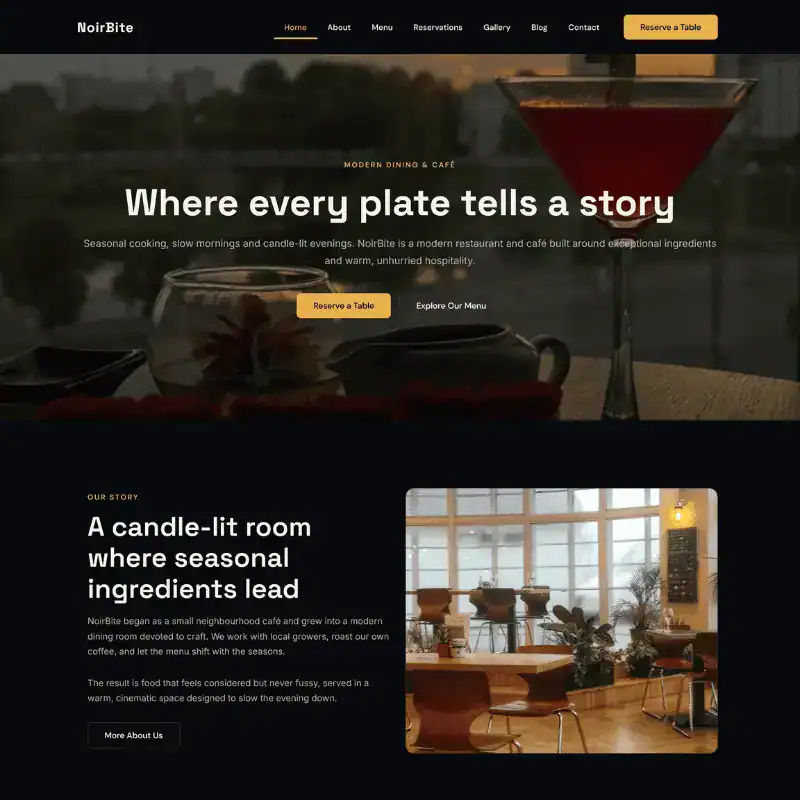
A complete restaurant and cafe website for Elementor that runs on free plugins only – no paid plugins needed. 7 pages, 6 blog articles, a sticky header, footer, mobile menu and booking forms, imported in one click, with global colours ready to change in one place.
$29.00
After payment: your licence key by email, for a one-click import with our free plugin. Installation guide
Want to see this website in action? Click ‘Live Preview’ to explore the demo, or submit the contact form to get a personalized quote today!
Description
NoirBite — a complete restaurant and cafe website
A full Elementor website template for restaurants, cafes, bistros and bars. Not a single page — a complete site, with the header, footer, blog and booking forms already in place.
Runs on free plugins only. No paid plugins needed. Built on Elementor 4.2, with global colours and fonts already configured, so changing your brand colour updates the whole site rather than forty individual elements.
What is included
7 ready-made pages covering what a restaurant site actually needs — home, about, menu, reservations, gallery, blog and contact.
6 blog articles with categories and featured images, so your journal looks finished from day one.
- Header — site-wide and sticky, with navigation and a Reserve a Table button
- Footer — site-wide
- Mobile menu — a proper slide-in menu, not a squashed desktop one
- Forms — table reservation, contact and newsletter, sent to your site’s email address
- Blog, category, search and 404 pages styled to match the rest of the site
Site settings — global colours, global fonts and theme style settings come with the template.
One-click import. Our free CodersNoyan Templates plugin imports everything and sets the menu and homepage for you, so the site works like the demo as soon as it finishes.
What you need
| Elementor | 4.2 or newer (free plugin) |
| Elementor Header & Footer Builder | Free plugin — header, footer, menu and blog list |
| Contact Form 7 | Free plugin — reservation, contact and newsletter forms |
| CodersNoyan Templates | Our free importer plugin — your licence key unlocks NoirBite |
| WordPress | 6.0 or newer |
| PHP | 7.4 or newer (8.1+ recommended) |
| Memory limit | 256MB or higher |
| Theme | Hello Elementor recommended |
You do not need to hunt for these plugins: the importer lists them and installs and activates each one with a click.
Before you import
- Take a full backup — site files and database. UpdraftPlus does this free. Importing changes your global colours, fonts, pages and menu, and you want a way back.
- Use a fresh or staging site if you can. This template is designed for a new build. Importing onto an existing site with its own design will overwrite your global styles.
- Install the Hello Elementor theme and activate it. Other themes usually work, but Hello is what the template was built against and adds no styling of its own to fight with.
- Check your memory limit. Under Elementor → System Info, look for WP Memory Limit. If it is under 256MB, ask your host to raise it — low memory is the most common cause of a failed import.
How to import
- Once your payment is confirmed, your licence key arrives by email and stays in your account.
- Install the free CodersNoyan Templates plugin on your site. The download link is in your order email and in the installation guide.
- In WordPress, go to Appearance → CodersNoyan Templates and paste your licence key.
- Open NoirBite. Under Step 1: Plugins, install and activate the free plugins it lists.
- Under Step 2: Import, click Import NoirBite and wait. It usually takes a minute or two. Do not close the tab.
- When it finishes, click View your site. The header, footer, pages, blog and menu are already live.
After importing
- Replace the demo content — logo, text, images, your menu items and prices.
- Update global colours if you want your own palette — Elementor → Site Settings → Global Colors. Changing them here updates the entire site.
- Check your forms — Contact → Contact Forms. Messages go to your site’s admin email; change the address in each form’s Mail tab if you want them elsewhere.
If something goes wrong
The Import button is greyed out. Install and activate the plugins listed under Step 1 first, and make sure your licence key is entered.
The import stops partway. Usually memory or hosting space. Raise the PHP memory limit to 256MB, check your hosting account is not full, and click Import again — you can safely re-run the import.
Icons are missing. Go to Elementor → Settings and make sure Font Awesome is enabled, then clear your cache.
The header or footer does not appear. Check that Elementor Header & Footer Builder is active, then open the header or footer template and make sure its display rule is set to Entire Website.
Still stuck? See the installation guide, or email support and I will help you get it running.
Licence
Use on one website that you own or build for a client. You can modify it freely. You may not resell, redistribute or include the template files in another product.
Includes email support for installation questions.
How you get it
- Order and pay. Once your payment is confirmed, your licence key arrives by email and stays in your account.
- Install our free CodersNoyan Templates plugin on your WordPress site and paste the key. Download the plugin
- Open NoirBite and click Import. The plugin installs what it needs (Hello Elementor theme, Elementor, Elementor Header & Footer Builder, Contact Form 7) and sets up every page, the header and footer, the forms, the menu and the photos.